
Myth Engine: Creating Pacific Wings
Build a Vertical Scrolling Shooter, Step by Step
You’ll build Pacific Wings in Myth Engine, a game engine for Windows that makes 2D and 3D games. You can follow this whole guide in the free demo.
Start Chapter 1: The Fighter Flies First, read the opening of Making What a Card Shows
Welcome
This is Pacific Wings, the game you’re about to make. Play it first. Every plane, island and tracer in it is one you’ll put there.
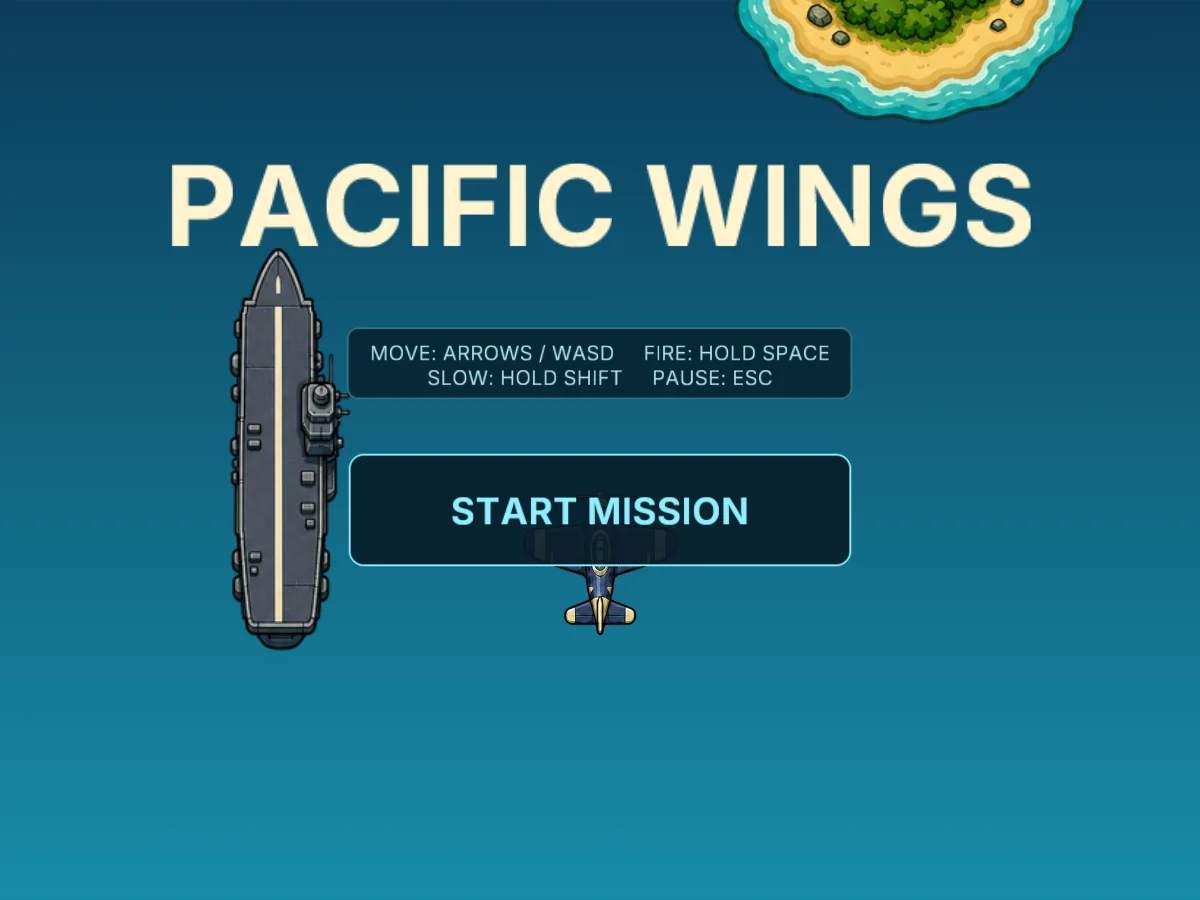
Click the game, then press Enter to start.
The title screen waits over the sea, with the carrier off to one side. Click the game, so your keys reach it. Then press Enter, or click START MISSION. You’re in the air. These are your keys:
- The arrow keys, or W, A, S and D, steer the Fighter.
- Hold Space, and the guns fire for as long as you hold it.
- Hold Shift for Focus. The Fighter slows down and shows its hit area, the one small part of it that can be hit.
- Esc pauses the mission. Press it again, or Enter, to fly on.
Get the Starter Kit
You’ll build Pacific Wings in Myth Engine. If it isn’t on your computer yet, choose a version below.
Free demo
Free
- No time limit
- Build, save and playtest your games
- Follow every game guide and build its game
Publishing needs the full version.
Try the free demoFull version
$84.99 USD, once
No subscription, no paid upgrades, every update included.
Everything in the free demo, plus:
- Publish your game as one HTML file, a web folder, or desktop and mobile projects you build and sign
- Share it or sell it, with no royalties, however much it earns
- Let players build their own version of your game, within the parts you allow (Builder Mode)
Windows 10/11, 64-bit · One person, on computers you own or control · Checkout and downloads through itch.io · Made by 3D Mage
License agreementMac, refunds and other questionsWhy pay for Myth Engine when free engines exist?
Every picture, sound and background the game uses comes in one Myth Pack. That’s the Starter Kit. Chapter 1 makes a new Blank 2D project and installs the kit into it, and it takes you through both. The kit’s button is here too. Download it now if you like. The note under the button says how to install it, but wait for Chapter 1, so the kit goes into the new project.
To install it, open Myth Engine (the free demo works), choose File › Install Myth Pack… and pick the downloaded file.
The Story
The sea fills the screen, deep blue at the top and lighter toward the bottom. A long gray carrier rests on it. Near her, one navy-blue Fighter waits, with cream wingtips and a gold propeller.
You fly the Fighter.
It heads north along the route, over a jungle atoll, a coral reef and a bank of white cloud. Enemy Fighters, Enemy Aces and Heavy Bombers wait along the way, and every one of them shoots back.
The Command Bomber waits at the end, a dark gray giant with four engines. Shoot it down, and the route begins again, harder, under a dusk sky and then a night one. Bring down the third, and the screen says MISSION COMPLETE. Lose your last plane first, and it says MISSION FAILED.
What You’ll Build
Everything you played above. The chapters build it in this order, one line each:
- A Fighter that flies where you steer it and leans into its turns. It never leaves the view, and the camera carries it north.
- Machine guns. Hold Space, and pale blue tracers leave the Fighter’s nose, one every 0.14 seconds.
- Enemy Fighters. They wait along the route and fly south as you reach them. One hit, a burst of flak, and each breaks up for 100 points.
- Enemies that shoot back. Lose a plane, and the next one flies up from below the screen, blinking and protected. Small cream planes count the ones in reserve. Lose the last, and it’s MISSION FAILED.
- The front door: PACIFIC WINGS and START MISSION, PAUSED when you need a breath, PLAY AGAIN, and a best score this device remembers.
- Red-orange Enemy Aces that weave and aim at you, and big olive-green Heavy Bombers that take five hits.
- The route itself. The carrier, the atoll, the reef and the cloud bank slide by below, and hidden milestones move the mission through its stages.
- Pickups. Wing Cannons, spinning, raise your weapon level. A Repair Crate brings one more plane.
- The kill chain. Shoot enemies down quickly, one after another, and the points multiply, up to four times. The score changes color to show it.
- Focus, and the hit area it shows, so you can slip between tracers.
- The Command Bomber, under its red health bar. It fights in three phases, and it’s worth 2000 points when it’s shot down.
- Three rounds, each under its own sky: a clear day, dusk orange, then night blue. And at last, MISSION COMPLETE.
Each chapter ends with a game that plays. The chapter’s Goal holds that game, so you can play it first and see where you’re headed.
How Each Chapter Teaches
A chapter builds its part of the game one piece at a time, and each piece comes as a story and a card. The story plays the moment in your head, the way you’ll see it in the game, and says roughly how it works. The card is the same piece written out exactly, every name and every number. Keep the story’s picture in mind, and build from the card. Then run your game, and watch it happen.
The cards have a page of their own, Making what a card shows. It shows how to make each kind of card. Read its first passage, Before your first card, before Chapter 1. Chapter 1 goes down its own cards with you, and the rest can wait until you need it.
Each chapter’s Goal also holds a catch-up download: that chapter’s finished project. If your game and the chapter part ways, save yours and open the download. Myth Engine keeps one project open at a time. So look at the piece in the download first, then open yours again from File > Open Recent, and compare. Or start the next chapter from the download, and keep going.
Get the Finished Game’s Project
The game at the top of this page is a Myth project, and you can open it. It’s the same file as Chapter 12’s catch-up download. Open it whenever you’d like to see how a finished piece fits together.
To open it, start Myth Engine, choose File › Open Project... and pick the downloaded file.
Myth Engine keeps one project open at a time. If yours has changes you haven’t saved, Myth Engine asks before it opens this one, and offers to save yours first.
In Chapter 1, one Fighter flies alone over an empty sea. Twelve chapters from now, it’s the game at the top of this page.