
Myth Engine: Creating Sky Ace
Build a Classic Arcade Shooter, Step by Step
You’ll build Sky Ace in Myth Engine, a game engine for Windows that makes 2D and 3D games. You can follow this whole guide in the free demo.
Start Chapter 1: The Fighter Flies First, read the opening of Making What a Card Shows
Welcome
This is Sky Ace. Play it first. Every plane, island and cloud in it, you’ll make yourself.
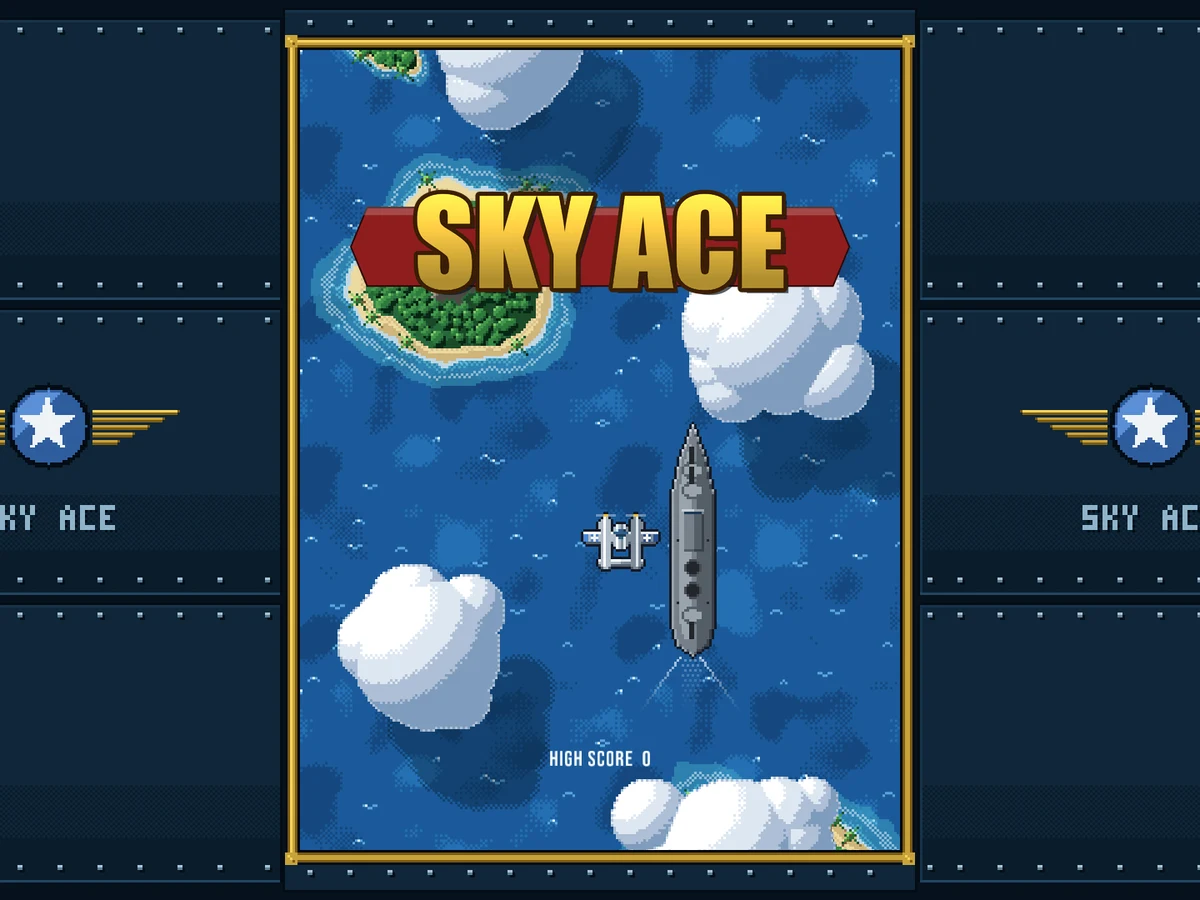
Click the game, then press Enter to take off.
The title screen waits over the sea. Click the game, and the Main Menu opens with START MISSION already chosen. If the game shows Tap to play first, that click only turns its sound on, so click once more. Press Enter, and you’re in the air. These are your keys:
- The arrow keys, or W, A, S and D, steer the Fighter.
- Hold Space, and the guns fire for as long as you hold it.
- B drops a bomb.
- Esc or P pauses the mission.
Get the Starter Kit
You’ll build Sky Ace in Myth Engine. If it isn’t on your computer yet, choose a version below.
Free demo
Free
- No time limit
- Build, save and playtest your games
- Follow every game guide and build its game
Publishing needs the full version.
Try the free demoFull version
$84.99 USD, once
No subscription, no paid upgrades, every update included.
Everything in the free demo, plus:
- Publish your game as one HTML file, a web folder, or desktop and mobile projects you build and sign
- Share it or sell it, with no royalties, however much it earns
- Let players build their own version of your game, within the parts you allow (Builder Mode)
Windows 10/11, 64-bit · One person, on computers you own or control · Checkout and downloads through itch.io · Made by 3D Mage
License agreementMac, refunds and other questionsWhy pay for Myth Engine when free engines exist?
Every picture, sound and background the game uses comes in one Myth Pack. That’s the Starter Kit. Download it here, or from Chapter 1. Chapter 1 begins by making a new Blank 2D project and installing the kit into it, and it takes you through both.
The words on the screen are in Bebas Neue, a tall, narrow font. It comes with Myth. There’s nothing more to download.
To install it, open Myth Engine (the free demo works), choose File › Install Myth Pack… and pick the downloaded file.
The Story
The Pacific Ocean slides down the screen, deep blue and flecked with white. Dark riveted metal frames it. A gold pilot’s wings badge sits on either side. Far below, islands drift past, then a destroyer, then a carrier with a wooden deck.
You fly one silver Fighter.
Four waves of enemy planes come down at you, from the CORAL SEA PATROL to the HEAVY SQUADRON, and every one of them shoots back. Hold on through all four. Then a WARNING blinks: HEAVY SKY FORTRESS APPROACHING.
Bring it down, and the banner says MISSION COMPLETE: THE SKY FORTRESS HAS FALLEN. Lose your last medkit first, and it says GAME OVER: YOUR SQUADRON FIGHTS ON WITHOUT YOU.
What You’ll Build
All of it. Here is the game, in the order the chapters build it:
- A Fighter that flies wherever you steer it, and never past the edge of its box.
- Machine guns. Hold Space, and gold rounds stream up the screen. Pips in the bottom bar show the gun level, from 1 to 4.
- Zero Fighters in a V. Two hits bring one down for 100 points, and the score climbs.
- Rounds that come back at you. Three medkits, a red flash when one gets through, a blink of protection, and GAME OVER when the last medkit is gone.
- The sea below: islands, a destroyer and a carrier drifting by, clouds sliding over them, and a plane’s shadow on every cloud it crosses.
- The Mission Timeline, which brings four waves on a clock, each opened by its banner.
- Red Aces that weave and fire in bursts, Dive Bombers that hover and then dive, and Heavy Bombers that take 36 hits.
- Pickups that drift down from shot-down planes: POWER UP!, SPREAD SHOT!, RAPID GUNS!, +1 BOMB and +1 MEDKIT. And the bomb, which clears every enemy round from the sky at once.
- The Sky Fortress, a 12-meter giant under its own health bar, and the MISSION COMPLETE banner when it falls.
- The front door: the SKY ACE title, a Main Menu, a PAUSED menu, and a high score kept from one mission to the next.
Ten lines, ten chapters. Each chapter ends with a game you can play. Its Goal lets you play that game right there on the page, so you can see where you’re going before you start.
How Each Chapter Teaches
Every piece of the game comes to you as a story and a card. The story puts the piece in your head: what it does, and roughly how. The card gives every exact name and number. Read the story, then build from the card with that picture in mind. Then run your game and watch it happen.
Making what a card shows is the page for the cards. It shows how to make each kind of card, in the editor’s own words. Read its first two passages, Before your first card and The Set up card, before Chapter 1. A paragraph there that starts with a later chapter, such as From Chapter 4, can wait for that chapter. Come back when a card shows you something new.
Every chapter also has a catch-up download in its Goal. It’s that chapter’s finished project. If your game and the chapter part ways, open it and compare the two. Or start the next chapter from it.
Get the Finished Game’s Project
The game at the top of this page is a project too. You can open it. It’s the same file as Chapter 10’s catch-up download. Open it whenever you want to see how a finished piece was put together.
To open it, right-click the downloaded file, choose Extract All... and then Extract. Start Myth Engine, choose File › Open Project... and pick the .mythproj file in the new folder. Beside it, OFL.txt is the license of the project’s font, Bebas Neue.
If your own project has changes you haven’t saved, Myth Engine asks first, and offers to save it before it opens this one.
In Chapter 1, one silver Fighter waits over an empty sea. Ten chapters from now, it’s the game you played above.