
Myth Engine: Creating Chess
Build a Classic Board Game, Step by Step
You’ll build Chess in Myth Engine, a game engine for Windows that makes 2D and 3D games. You can follow this whole guide in the free demo.
Start Chapter 1: The Board and the Pieces First, read the opening of Making What a Card Shows
Welcome
This is Chess, the game you’re about to make. Play it first. Every Square, every Piece and every rule in it is one you’ll put there. Only the Computer’s thinking comes from outside. It’s a chess program, and you’ll add it in Chapter 7.
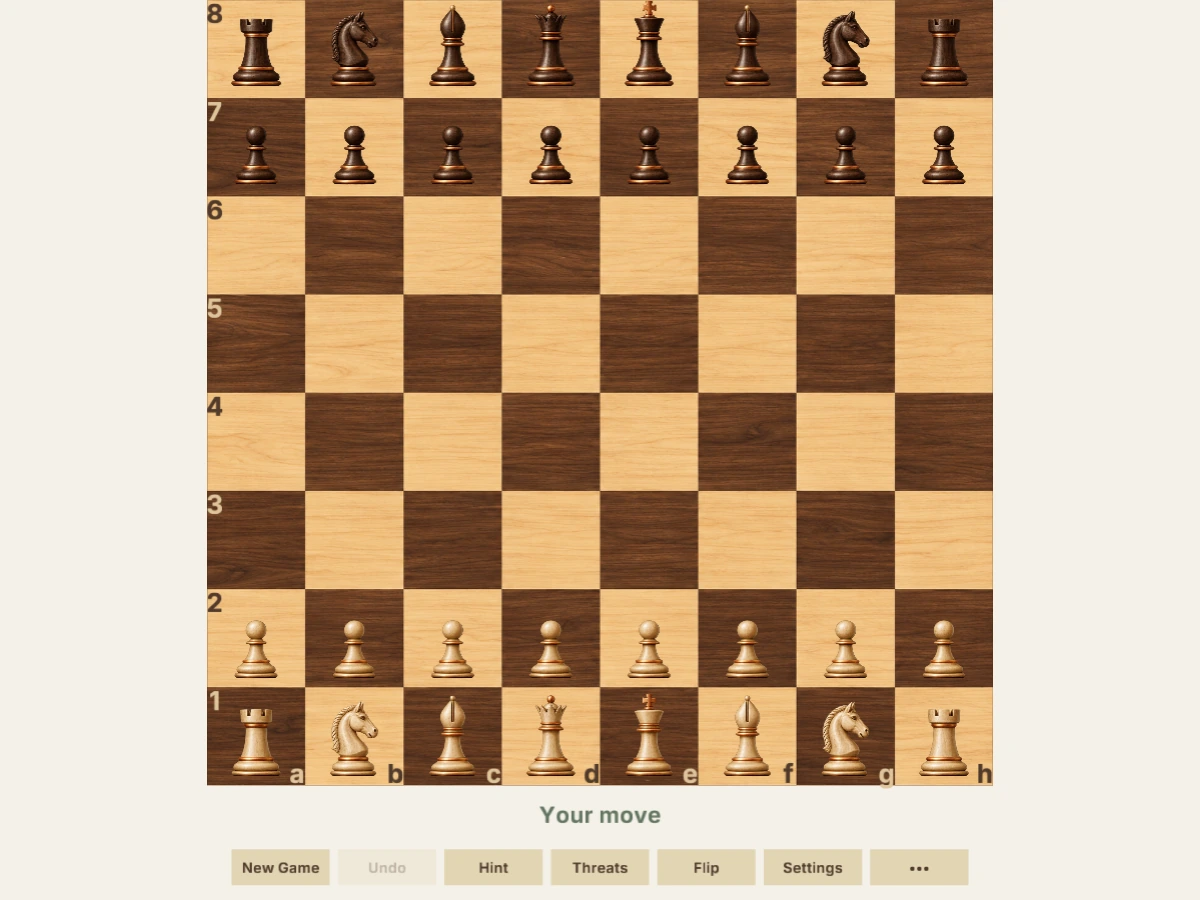
Click the game to play.
Click one of your Pieces. Its Square turns light gold. A small dot marks each empty Square it can reach, and a ring circles any enemy Piece it can capture. Click a dot or a ring, and your Piece moves there. Then the Computer takes its Turn. The line under the Board says Thinking…, and a moment later its Piece glides to its answer.
The buttons under the Board hold the rest. These are the ones you’ll want first:
- New Game lets you choose your Side, White or Black, and how strong the Computer plays.
- Undo takes back your last Turn.
- Hint asks the Computer what it would play in your place.
- Threats marks every Piece that could be captured.
You can also play from the keyboard. The arrow keys move between Squares, Enter or Space selects, and Escape clears.
Get the Starter Kit
You’ll build Chess in Myth Engine. If it isn’t on your computer yet, choose a version below.
Free demo
Free
- No time limit
- Build, save and playtest your games
- Follow every game guide and build its game
Publishing needs the full version.
Try the free demoFull version
$84.99 USD, once
No subscription, no paid upgrades, every update included.
Everything in the free demo, plus:
- Publish your game as one HTML file, a web folder, or desktop and mobile projects you build and sign
- Share it or sell it, with no royalties, however much it earns
- Let players build their own version of your game, within the parts you allow (Builder Mode)
Windows 10/11, 64-bit · One person, on computers you own or control · Checkout and downloads through itch.io · Made by 3D Mage
License agreementMac, refunds and other questionsWhy pay for Myth Engine when free engines exist?
Every picture the game uses comes in one Myth Pack, the Starter Kit: four Boards, three Piece Sets, and eight more pictures for the marks and the panels. Chapter 1 begins with a new Blank 2D project and the kit installed into it, and it shows you how to make both. Here’s its button, if you’d like to download the kit now. Keep it for Chapter 1. It goes into your new Chess project there.
To install it, open Myth Engine (the free demo works), choose File › Install Myth Pack… and pick the downloaded file.
The Story
A walnut Board fills the screen, light maple and dark walnut Squares on a page the color of paper. Thirty-two carved Pieces stand on their starting Ranks, pale wood at the bottom and dark wood at the top. Under the Board, two gray-green words say Your move.
You play one Side.
Across the Board, the Computer plays the other. While it thinks, the line says Thinking…, and then its Piece glides to its new Square.
The game is fair. It lets no Move break the rules, yours or the Computer’s. It ends when a King is in Check with no Legal Move left, and the line says You win · Checkmate, or You lose · Checkmate. A game can also end in a Draw, or when you Resign.
What You’ll Build
All of it, in twelve chapters. Each line below is what the game gains in one of them.
- A walnut Board on a page the color of paper, thirty-two Pieces on their starting Ranks, and the Rank numbers and File letters along its left and bottom edges. Nothing moves yet. It only looks ready.
- Click a Piece, and its Square turns light gold, with dots and rings where it may go. Click one, and it goes. Every Kind moves its own way, but for now either Side may move at any time.
- The rules. White moves first, the Sides take turns, and no Move may leave its own King attacked. A King in Check stands on a red Square.
- The three Moves that surprise new players: Castling, En Passant, and Promotion, when the game stops to ask what a Pawn on the last Rank should become.
- A game that can end. Checkmate, Stalemate and three Draws by rule each say so under the Board, and the final position stays where it is.
- A row of buttons. New Game asks which Side you’ll play and how strong the other Side should be, and Flip turns the Board around.
- The Computer. The line says Thinking…, and then its Piece glides to its Square. Undo takes your last Turn back.
- The Hint. Two Squares turn blue-green, and a message says Try e2 to e4.
- Threats. A red outline marks a Piece that could be captured, a ring inside it means nothing could capture back, and an amber bar sits under a pinned Piece.
- Lines and arrows. A dashed amber line runs from each pinning Piece to the King behind it. Click any Piece in Threats mode, and arrows show what it attacks.
- Three Piece Sets, four Board Finishes, and a memory. Close the game and open it again, and your game is waiting where you left it.
- The Game menu, with every Move written down, How to play and Resign. And a way to play a whole game from the keyboard.
Every chapter ends with a game you can play. Its Goal holds that game, so you can try it before you build it.
How Each Chapter Teaches
A chapter builds its part of the game one piece at a time, and each piece comes as a story and a card. The story plays the moment in your head, the way you’ll see it on the Board. It says roughly how the piece works. The card is the same piece written out exactly, with every name and every number. On the page, each card sits above its story, so when a card is long, read the story under it first. Build from the card with the story’s picture in mind. Then run your game, and watch it happen.
The cards have a page of their own, Making what a card shows. It shows how to make each kind of card, in the editor’s own words. Read its first passage before Chapter 1. Each chapter sends you back for the others, the first time a card needs one.
Each Goal also holds a catch-up download. It’s that chapter’s finished project, so if your game and the chapter part ways, you can open it and compare. Or start the next chapter from it, and keep going. Every download already holds the whole Starter Kit.
Get the Finished Game’s Project
The game at the top of this page is a Myth project, and you can open it. It’s the same project as Chapter 12’s catch-up download. Open it any time you’d like to see how a finished piece fits together.
To open it, right-click the downloaded file, choose Extract All... and then Extract. Start Myth Engine, choose File › Open Project... and pick the .mythproj file in the new folder. CREDITS.md and the licenses folder beside it come with the game.
Myth has one project open at a time. If yours has changes you haven’t saved, Myth Engine asks before it opens this one, and offers to save yours first.
In Chapter 1, a walnut Board holds thirty-two Pieces, and not one of them can move. Twelve chapters later, it’s the game at the top of this page.