
Myth Engine: Creating Crystal Cascade
Build a Falling-Block Puzzle Game, Step by Step
You’ll build Crystal Cascade in Myth Engine, a game engine for Windows that makes 2D and 3D games. You can follow this whole guide in the free demo.
Start Chapter 1: Falling Crystals First, read the opening of Making What a Card Shows
Welcome
This is Crystal Cascade. Play it first. Every piece of it, you’ll make yourself.
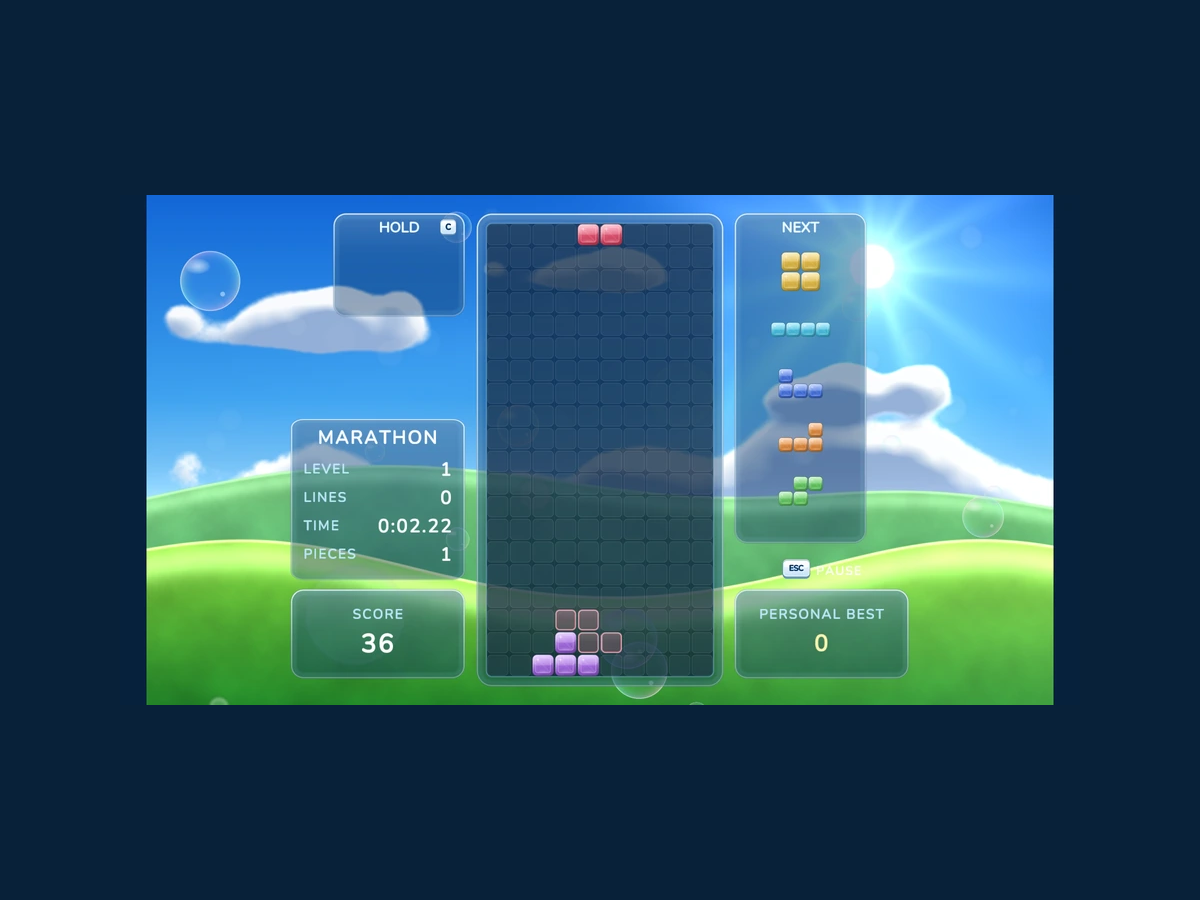
Click the game, then press Enter to start.
On the title screen, press Enter or click, and the Main Menu opens. Choose a mode. In the well, these are your keys:
- Left and Right arrows move the falling piece.
- Up or X turns it. Z or Ctrl turns it the other way, and A gives it a half turn.
- Hold Down to drop it faster. Space drops it all the way at once.
- C or Shift puts it aside in Hold, and brings it back later.
- Esc or P pauses the game.
Get the Starter Kit
If it isn’t on your computer yet, choose a version below.
Free demo
Free
- No time limit
- Build, save and playtest your games
- Follow every game guide and build its game
Publishing needs the full version.
Try the free demoFull version
$84.99 USD, once
No subscription, no paid upgrades, every update included.
Everything in the free demo, plus:
- Publish your game as one HTML file, a web folder, or desktop and mobile projects you build and sign
- Share it or sell it, with no royalties, however much it earns
- Let players build their own version of your game, within the parts you allow (Builder Mode)
Windows 10/11, 64-bit · One person, on computers you own or control · Checkout and downloads through itch.io · Made by 3D Mage
License agreementMac, refunds and other questionsWhy pay for Myth Engine when free engines exist?
Every picture, sound and background the game uses comes in one Myth Pack. That’s the Starter Kit. Make a new Blank 2D project, and install the Starter Kit into it: choose File › Install Myth Pack… and pick the file. Chapter 1 starts there.
To install it, open Myth Engine (the free demo works), choose File › Install Myth Pack… and pick the downloaded file.
The Story
The sky is bright blue, and the sun is out. Green hills roll along the bottom of the screen. In the middle stands a tall glass well, ten crystals wide and twenty deep.
Pieces fall into it one at a time. Each one is four crystals, in one of seven shapes and seven colors. You decide where each piece lands.
Fill a row from wall to wall, and it shatters into shards of light. Let the crystals stack up to the top, and the whole stack turns to gray stone.
What You’ll Build
All of it. Here is the game, in the order the chapters build it:
- Pieces that fall into the well, slide left and right, and settle crystal on crystal.
- Pieces that turn, and step away from a wall to do it. A ghost waits where the piece will land, and Space sends the piece there with a thud and streaks of light.
- Full rows that shatter into shards of their own colors, and a LINES count that climbs.
- Shuffled bags of all seven pieces, a Next panel with five on the way, and Hold.
- A name and a sound for every clear, from SINGLE to CASCADE!, with twists, combos, BACK-TO-BACK and ALL CLEAR! paying more. Every ten lines brings a new level, and faster crystals.
- GAME OVER, when the stack turns to stone, and a results panel that tells the story of your game.
- A Title screen with soap bubbles and drifting crystals, and a six-choice Main Menu.
- Four ways to play: MARATHON to 150 lines, SPRINT 40, two minutes of ULTRA, and ZEN, which never ends. Each keeps its own personal best.
- READY, 3, 2, 1, GO! before the first piece, and a pause whenever you need one.
That’s nine chapters, one for each line. Each chapter ends with a game you can play. Its Goal lets you play it right there on the page, so you can see where you’re going before you start.
How Each Chapter Teaches
Every piece of the game comes to you as a story and a card. The story puts the piece in your head: what it does, and roughly how. The card gives every exact name and number. Read the story, then build from the card with that picture in mind. Then run your game.
Making what a card shows is the page for the cards. It shows how to make each kind of card, in the editor’s own words. Read its first two passages before Chapter 1, and come back when a card shows you something new.
Every chapter also has a catch-up download in its Goal. It’s that chapter’s finished project. If your game and the chapter part ways, open it and compare. Or start the next chapter from it.
Get the Finished Game’s Project
The game at the top of this page is a project, too. You can open it. It’s the same file as Chapter 9’s catch-up download. Open it whenever you want to see how a finished piece was put together.
To open it, right-click the downloaded file, choose Extract All... and then Extract. Start Myth Engine, choose File › Open Project... and pick the .mythproj file in the new folder. Nunito-OFL.txt beside it comes with the game.
If your own project has changes you haven’t saved, Myth Engine asks first, and offers to save it before it opens this one.
When you start Chapter 1, the well is an empty glass box under the sky. Nine chapters from now, it’s the game you played above.