
Myth Engine: Creating Pitch Shot
Build a Musical Slingshot Game, Step by Step
You’ll build Pitch Shot in Myth Engine, a game engine for Windows that makes 2D and 3D games. You can follow this whole guide in the free demo.
Start Chapter 1: A Stage Stands First, read the opening of Making What a Card Shows
Welcome
This is Pitch Shot, the game you’re about to make. Play it first. Every note, every tower and every star in it is one you’ll put there yourself.
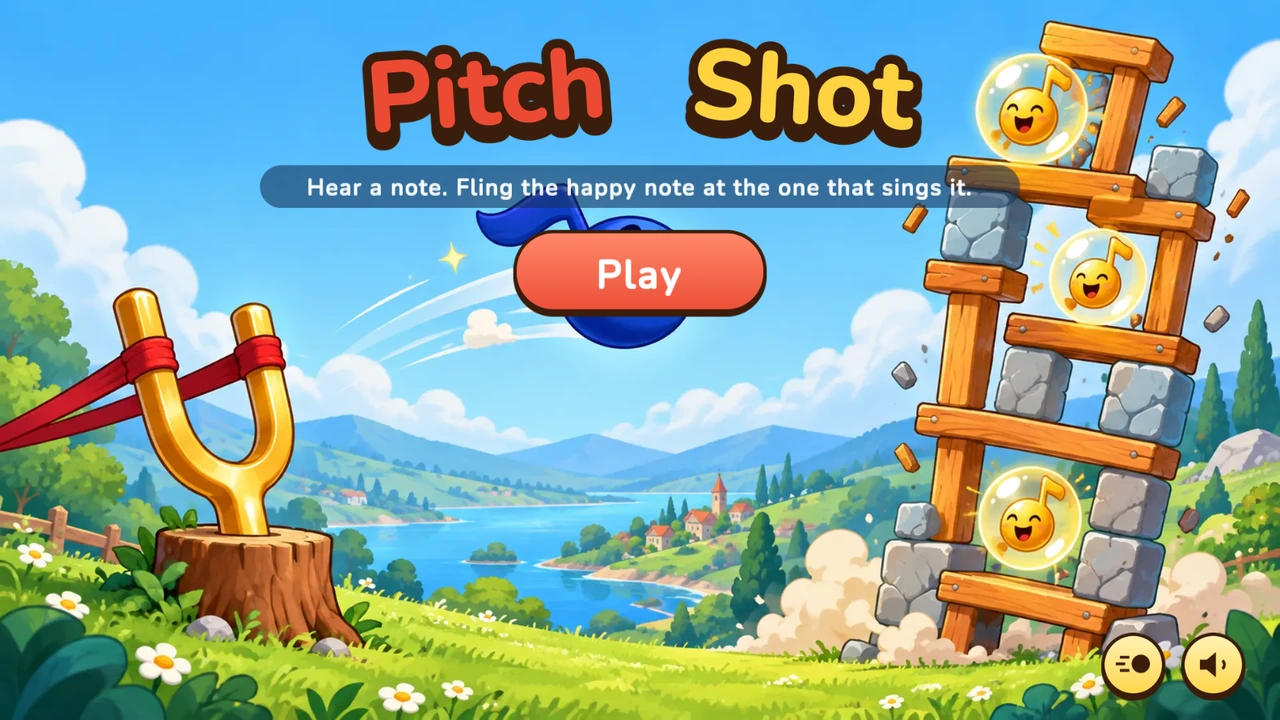
Click the game, then press Enter to start.
Press Enter, or click Play. Choose a place, and then a stage. The notes in the tower sing once, from low to high. After that, one of them sings alone, and that’s the one you’re after.
Pull the happy note back on the slingshot’s band, with the mouse or a finger, and let go. A line of white dots shows where it will fly. You can aim from the keyboard too. The arrow keys or W, A, S and D aim, and Enter lets go. Space plays the call again whenever you’d like to hear it. Escape goes back.
Get the Starter Kit
You’ll build Pitch Shot in Myth Engine. If it isn’t on your computer yet, choose a version below.
Free demo
Free
- No time limit
- Build, save and playtest your games
- Follow every game guide and build its game
Publishing needs the full version.
Try the free demoFull version
$84.99 USD, once
No subscription, no paid upgrades, every update included.
Everything in the free demo, plus:
- Publish your game as one HTML file, a web folder, or desktop and mobile projects you build and sign
- Share it or sell it, with no royalties, however much it earns
- Let players build their own version of your game, within the parts you allow (Builder Mode)
Windows 10/11, 64-bit · One person, on computers you own or control · Checkout and downloads through itch.io · Made by 3D Mage
License agreementMac, refunds and other questionsWhy pay for Myth Engine when free engines exist?
Every picture and sound the game uses comes in one Myth Pack, the Starter Kit, along with Nunito, the font its words are written in. There are twelve painted places, the slingshot, the notes and the blocks, 27 piano notes, and a tune for each place. It goes into a new, empty Blank 2D project. Chapter 1 begins there.
To install it, open Myth Engine (the free demo works), choose File › Install Myth Pack… and pick the downloaded file.
The Story
A green meadow lies under a bright blue sky, with a lake and a little red-roofed village far below. On the left, a golden tuning fork stands in a tree stump, a red band stretched between its prongs. That’s the slingshot. On the right stands a tower of wooden posts and planks. Inside it, round notes with happy faces bob up and down, each on its own beat.
First they sing once, low to high. One of them sings again, alone. That’s the call.
You listen. You pull the happy note back on the band, and you fling it at the note you heard.
Find the right one, and it bursts into golden sparkles. Its tower comes down, wood knocking and stone thudding as the blocks tumble. Find a wrong one, and it shakes and sings its own pitch, so you can hear the difference before the call plays again.
Nothing is lost here. A shot that reaches no note only says Missed! Listen again…, and the call comes round once more. Stars are for listening: find the call with no wrong notes, and the stage gives you three. There are twelve places, from Sunny Meadow to Moonlit Castle, ten stages in each. After the last of the 120, every note of that stage sings.
What You’ll Build
All of it, in ten chapters. Each line below is what the game gains in one of them.
- Sunny Meadow, a slingshot with nothing in it, and a wooden tower with two singing notes inside, bobbing, waiting. Nothing sings yet.
- The notes find their voices. They sing once, low to high, each one swelling as it sings. One sings alone. Press Space, and it sings again. The meadow’s tune steps aside whenever a note sings.
- The happy note arrives in the band, ready to go. Pull it back, and the band stretches, and white dots show where it would fly. It can’t fly yet.
- Let go, and it flies. It arcs, lands, rolls and comes to rest, and the next one loads. A shot that reaches no note says Missed! Listen again…
- Wrong notes. A wrong note shakes and sings its own pitch, and the towers stand firm. After two wrong notes, a gold arrow points the way.
- The tower comes down. The right note bursts into sparkles, time slows, and the blocks tumble, throwing splinters and dust.
- Winning. “That’s the one!”, stars for listening, and a bar that fills before the next stage stands up.
- The front door: the title painting, the logo and Play. Next come twelve places to choose from, each with its ten stages, and a way back from each.
- Locks and keys. A stage opens once the stage before it has a star. The arrow keys choose a card, Enter opens it, and Escape goes back.
- A memory. The game keeps your stars and your choices, and the Sound and Motion buttons begin to work. The last stage sings its farewell. Pitch Shot is complete.
Every chapter ends with a game you can play. Its Goal holds that game, so you can try it before you build it.
How Each Chapter Teaches
A chapter builds its part of the game one piece at a time, and each piece comes as a story and a card. The story plays the moment in your head, the way you’ll see and hear it in the game. It says roughly how the piece works. The card is the same piece written out exactly, with every name and every number. Build from the card with the story’s picture in mind. Run your game, and listen.
The cards have a page of their own, Making what a card shows. It shows how to make each kind, in the editor’s words. Read its first passage before Chapter 1, and come back whenever a card shows something new.
Each Goal also holds a catch-up download. It’s that chapter’s finished project, so if your game and the chapter part ways, you can open it and compare. Or start the next chapter from it, and keep going. Each download is a zip, so unzip it first, and the project inside already holds the whole Starter Kit.
Get the Finished Game’s Project
The game at the top of this page is a Myth project, the same one as Chapter 10’s catch-up download. You can open it. Look inside any time you’d like to see how a finished piece fits together.
To open it, right-click the downloaded file, choose Extract All... and then Extract. Start Myth Engine, choose File › Open Project... and pick the .mythproj file in the new folder. Nunito-OFL.txt beside it comes with the game.