
Myth Engine: Creating Shatterfield
Build an Arcade Space Shooter, Step by Step
You’ll build Shatterfield in Myth Engine, a game engine for Windows that makes 2D and 3D games. You can follow this whole guide in the free demo.
Start Chapter 1: The Ship Flies First, read the opening of Making What a Card Shows
Welcome
This is Shatterfield. Play it first. Every piece of it, you’ll make yourself.
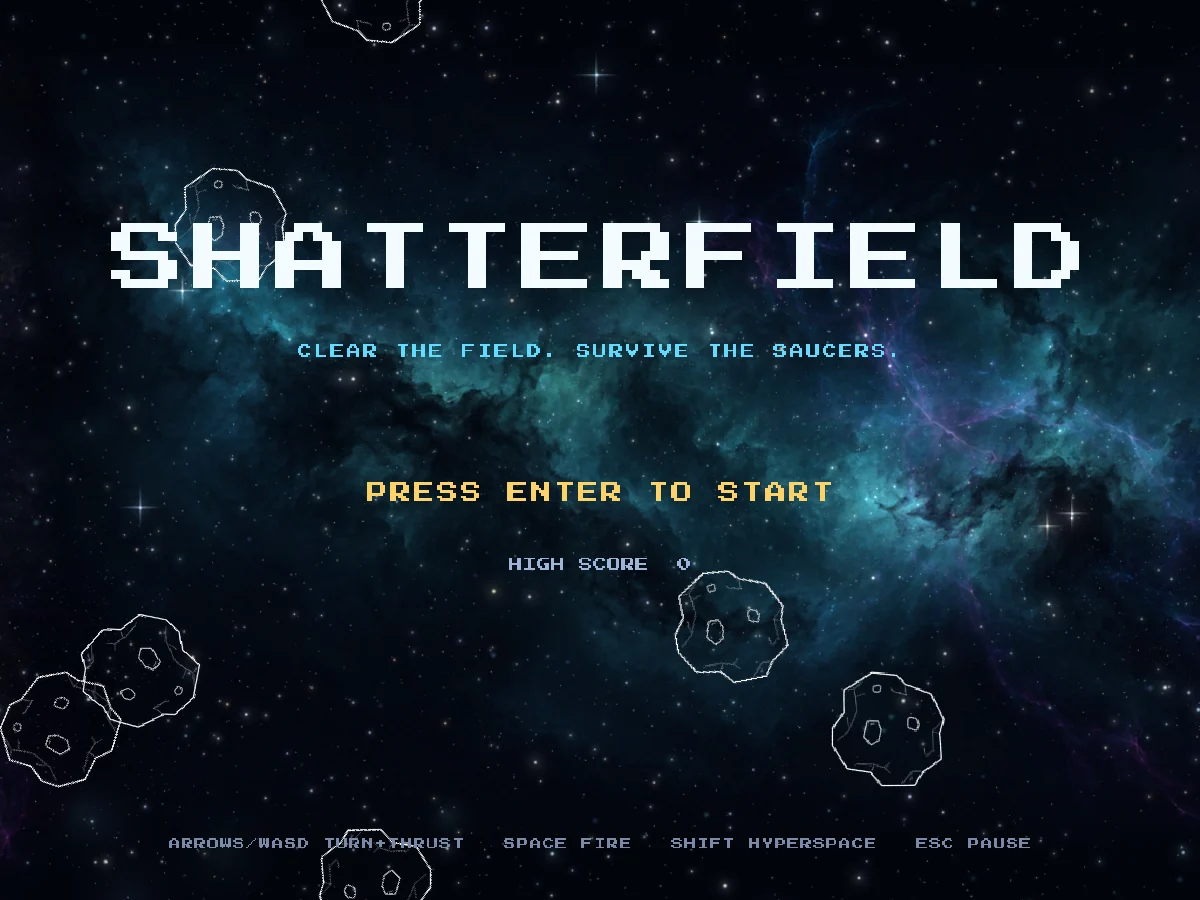
Click the game, then press Enter to start.
The title screen waits for you. Press Enter or Space, and the first wave comes in. These are your keys:
- Left and Right arrows, or A and D, turn the Ship.
- Up, or W, fires its engine, and when you let go, the Ship keeps drifting the way it was going.
- Space fires.
- Shift jumps through hyperspace, out of trouble and into somewhere new.
- Esc or P pauses the game.
Get the Starter Kit
If it isn’t on your computer yet, choose a version below.
Free demo
Free
- No time limit
- Build, save and playtest your games
- Follow every game guide and build its game
Publishing needs the full version.
Try the free demoFull version
$84.99 USD, once
No subscription, no paid upgrades, every update included.
Everything in the free demo, plus:
- Publish your game as one HTML file, a web folder, or desktop and mobile projects you build and sign
- Share it or sell it, with no royalties, however much it earns
- Let players build their own version of your game, within the parts you allow (Builder Mode)
Windows 10/11, 64-bit · One person, on computers you own or control · Checkout and downloads through itch.io · Made by 3D Mage
License agreementMac, refunds and other questionsWhy pay for Myth Engine when free engines exist?
Every picture, sound and background the game uses comes in one Myth Pack, with the Arcade HUD Font for its words. That’s the Starter Kit. Make a new Blank 2D project with File > New Project…, and install the Starter Kit into it: choose File > Install Myth Pack… and pick the file. Chapter 1 starts there, and shows each step.
To install it, open Myth Engine (the free demo works), choose File › Install Myth Pack… and pick the downloaded file.
The Story
Deep space, far from anywhere. Behind everything hangs a nebula in teal, violet, red and gold. A ringed planet and a spiral galaxy sit far off in it, and nearer stars and dust drift past in front.
In the middle of it all waits one small white Ship with a cyan glow. You fly it.
Asteroids tumble in from the edges. Shoot one, and it shatters into two smaller ones. Shoot those, and they shatter again, until nothing is left but sparks. Clear the field, and the whole sky surges forward into the next sector, where more Asteroids wait.
Now and then a Saucer crosses the screen. It shoots back. The title screen says it all in six words: CLEAR THE FIELD. SURVIVE THE SAUCERS.
What You’ll Build
All of it. Here is the game, in the order the chapters build it:
- A Ship that turns, burns its cyan flame and drifts. Fly off one edge, and it comes back on the other.
- Shots, small darts of cyan light. Four can fly at once, and each is gone after 0.85 seconds.
- Hyperspace: the Ship vanishes in a burst of sparks and appears somewhere else.
- Asteroids that tumble across the field and break. A Large one leaves two Medium, a Medium two Small, and a Small only sparks.
- Crashes and lives. A new Ship blinks in, shielded for 3 seconds, and when the last one is gone, the game is over.
- Waves. WAVE 1 shows, and every cleared field brings the next one: faster rocks, more of them, made of a new material.
- Points that rise off every rock you break, a score that climbs, a high score beside it, and an EXTRA SHIP every 10,000 points.
- Saucers that cross the screen with their siren wailing. The large one fires in any direction, and the small one aims.
- A title screen over drifting rocks, PAUSED when you need a breath, GAME OVER with your final score, and a high score kept for next time.
- A heartbeat, two notes that come a little sooner each time while the rocks are out.
- The sky, six layers of nebula, stars and dust, each drifting at its own speed. Clear a field, and all of it surges forward.
Eleven lines, eleven chapters. Each chapter ends with a game you can play. Its Goal lets you play it right there on the page, so you can see where you’re going before you start.
How Each Chapter Teaches
Every piece of the game comes to you as a story and a card. The story puts the piece in your head: what it does, and roughly how. The card gives every exact name and number. Read the story, then build from the card with that picture in mind. Then run your game and watch it happen.
Making what a card shows is the page for the cards. It shows how to make each kind of card, in the editor’s own words. Read its first two passages, Before your first card and The Set up card, before Chapter 1. Come back when a card shows you something new.
Every chapter also has a catch-up download in its Goal. It’s that chapter’s finished project. If your game and the chapter part ways, open it and compare the two. Or start the next chapter from it. Each download carries the whole Starter Kit, the way your own project does.
Get the Finished Game’s Project
The game at the top of this page is a project too, and you can open it. It’s the same file as Chapter 11’s catch-up download. Open it whenever you want to see how a finished piece was put together.
To open it, right-click the downloaded file, choose Extract All... and then Extract. Start Myth Engine, choose File › Open Project... and pick the .mythproj file in the new folder. Beside it, OFL.txt is the license of the project’s font, Press Start 2P.
Myth shows one project at a time, so this one takes your own project’s place. If yours has changes you haven’t saved, Myth Engine asks first, and offers to save it before it opens this one. File > Open Recent brings yours back.
In Chapter 1, one Ship sits alone on a dark, empty screen. Eleven chapters from now, it’s the game you played above.