
Control Flow and Results
Build Loop Check to print a short sequence when you click the game. Click again to start its temporary counter at zero.
How the Parts Fit
The Mouse Press Event starts one execution of your connected Actions. Repeat has a fixed count, and While checks its Condition before each new pass through its body. If chooses one path.
- Loop Check
Attach the saved Logic once to one active Object.
left click
Mouse PressStart attempt at 0.
follow connections
Loops and BranchRepeat prints three indices. While reaches 3 before Done 3 and If.
- Choose the Condition
attempt == 3 prints Branch yes; attempt == 4 prints Branch no.
attempt is a Local Variable declared by this execution. Another Mouse Press execution gets its own value. Use an Object Variable or Project Global for state that must survive between Events.
Your Part
Use an existing playable Scene with one active Object placement. Add a Logic Component named Loop Check through Resources, then attach it once to that Object. The Logic Components guide covers attachment and placement overrides.
Keep one enabled owner for this example. Each enabled owner can run its own copy of the Event. Stop the playtest before editing.
Open Loop Check, select Add Event, then find Mouse Press. Select it and choose OK. The next dialog asks for a Mouse button; select left and confirm with OK.
Select the Mouse Press Mode before adding each outer Action below through the Action List. Search for its exact name. If a block is unattached, right-click it and select Connect to Sequence.
Click a field to replace its contents, then press Ctrl+Enter to commit. Trace the connections after each addition.
Build the Loop Check
Declare the counter first.
- Add Declare Variable with type Number, name
attempt, and value0. - Add Repeat and set its count to
3. - Right-click Repeat and choose Add Inside Repeat, then find and select Print Debugger Message. Choose OK.
- Set that Print’s Message to
Repeat {local.index} of {local.count}. Keep Category asGeneraland Type asLog.
Repeat’s child Action runs once for each index: 0, 1, then 2, with local.count fixed at 3. An Action connected after Repeat runs once after those repetitions.
Next, increase attempt to three.
- Select the Mouse Press Mode, then add While after Repeat. Enter
attempt < 3in its Condition. - Right-click While and choose Add Inside While. Add Change Variable.
- Set Variable to
attempt, keep the operator=, and set Value toattempt + 1. - Use Add Inside While again to add Print Debugger Message after that change. Set Message to
Attempt {attempt}. - Select the Mode and add one outer Print Debugger Message after While. Set Message to
Done {attempt}.
Keep both new Print Actions at Category General and Type Log. Confirm the While body contains the increment followed by its Print, with the final Print outside the loop and connected onward to End.
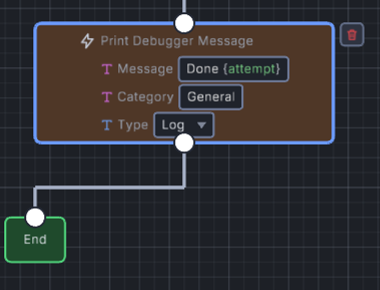
- Message reads Done {attempt}; braces insert the current local value.
This card is made from the saved project, with each child Action indented inside its owning loop.
Event: Mouse Press, left button
- Declare Variable: Number
attempt=0. - Repeat
3times:- Print Debugger Message:
Repeat {local.index} of {local.count}.
- Print Debugger Message:
- While
attempt < 3:- Change Variable:
attempt = attempt + 1. - Print Debugger Message:
Attempt {attempt}.
- Change Variable:
- Print Debugger Message:
Done {attempt}.
End
Save the project, close it, and reopen that saved file. Start Debug Play, left-click inside the game, and open the Debugger’s Console tab. Expect these seven messages in order:
Repeat 0 of 3Repeat 1 of 3Repeat 2 of 3Attempt 1Attempt 2Attempt 3Done 3Click again to repeat the same seven messages. Declare Variable starts this new execution’s attempt at 0.
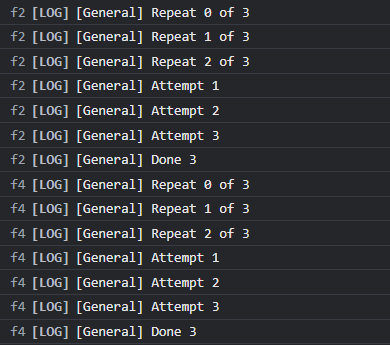
- The second click finishes at Done 3 again.
Stop the run, change Repeat’s count to 0, then save and start fresh Debug Play. The Repeat messages disappear; While still prints Attempt 1 through Attempt 3, followed by Done 3. Restore Count 3 before the branch check.
Test Both Branches
Extend the same sequence after its final Print.
- Select the Mouse Press Mode and add If after
Done {attempt}. Enterattempt == 3in Condition. - Right-click If and choose Add Inside Then, then add Print Debugger Message with Message
Branch yes. - Choose Add Else from If’s right-click menu. The new Else has its own right-click menu; choose Add Inside Else there.
- Add Print Debugger Message there with Message
Branch no. Keep both Prints at CategoryGeneraland TypeLog.
Follow the True connection into Branch yes, and False into Else’s Branch no. Both paths continue after the branch.
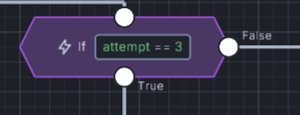
- Condition is attempt == 3; edit this expression to test the other path.
Save, close, and reopen the project. In fresh Debug Play, each click should print the seven loop messages, then Branch yes.
Stop and change only the If Condition to attempt == 4. Save, close, and reopen again. Each click should now end with Branch no, because While leaves attempt at 3.
Choose the Scope and Repetition
| Choice | What It Changes | When to Pick It |
|---|---|---|
| Repeat | Runs its body a fixed number of times. | Use a known count, such as the three index messages. Count 0 skips the body. |
| While | Checks its Condition before each pass. | Repeat until changing state reaches a boundary, such as attempt < 3. Change that state inside the body. |
| If and Else | Chooses one path from the Condition’s Boolean value. | Put different Actions on the true and false paths. Test both values. |
| Declared Local Variable | Holds temporary state for this execution from its declaration onward. | Keep attempt within one click’s work. Each new invocation gets its own locals. |
| Loop local | Supplies the current loop’s context inside its body. | Use local.index for the current pass. Repeat also provides local.count; While provides local.iteration. |
| Object Variable or Project Global | Keeps runtime state beyond this Event execution. | Store a value that another Event needs. See Variables and Shared State. |
Restart Debug Play after each saved edit. Repeat rounds positive fractional counts down and treats negative counts as zero. While supplies local.index and local.iteration, both starting at 0. It has no predetermined local.count.
Keep Results on Their Path
A query supplies result fields. Name the result, then select its fields from typed completion. Run the producer first on every path that reads its result, including branches that later join.
Results from another Event or an unattached block are outside this sequence. For a value needed during another Event, copy it into declared Object state or a Project Global. A new Local Variable remains temporary.
Follow the named Boolean example for the exact Check Exists result naming and completion controls. It reads existsProof.value.
Find a Broken Connection or Condition
| What You See | What to Check |
|---|---|
| Only one Repeat message | Put its Print inside Repeat, then confirm Count 3. |
| No Repeat messages | Check Count and the Event’s connected path. Count 0 skips only Repeat’s body. |
| Two copies from one click | Check for another enabled owner or duplicate Logic attachment. Keep one enabled owner for this example. |
| While reaches its limit | Change the state tested by its Condition inside the body. Begin with a small boundary. |
| The next click starts with an old value | Check that Declare Variable runs before While. Confirm you selected the execution local, rather than persistent Object state. |
| A loop local is unavailable | Read it inside its owning loop. Store a needed value explicitly before leaving that scope. |
| The wrong branch prints | Inspect the value before If, then read the True and False connections separately. |
| A query result is unavailable | Connect its producer before every consumer on that path, and select the named typed result. |
While has a 10,000-iteration safety limit and warns when it reaches that limit. Make normal gameplay terminate through its Condition. Large loops in an update Event repeat work every frame; test a small count first.
Where to Look Next
Use the Action reference for exact fields and result types. Expressions explains typed value entry. Move reusable operations into a Function.
The published Choose Cheapest Cell lesson combines ordered Repeat and nested If in a working search. Its Relax Neighbors section uses the loop index to visit directions in order.
Myth Engine Documentation