
Accessibility Actions
Built-in authoring reference for Mercury 1.1.0. All actions.
Announce Accessible Text
Sends text to the game’s hidden assistive live region.
Open Game Settings → Accessibility, choosing Enable Accessible Game Model if the model is absent. Keep Enable Accessibility Projection for Run and Export on, then set Runtime Mode to Active · Tested Assistive Behavior. Expand Player Presentation and Motion. Enable Live Region Output before running the game, so the hidden assistive region can receive text.
In a Logic Component, add this Action from Accessibility > Announcements and Cues. Click its Message slot. After entering the announcement, press Ctrl+Enter to keep the text and choose Priority from its dropdown.
Shadow · Diagnostics Only leaves these output Actions inert. Active mode needs Live Region Output to create the hidden region. Turning projection off removes this output from each fresh Run, even when Active mode is still selected.
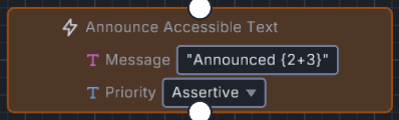
The block stores Announced {2+3} with Priority set to Assertive.
Reference key: accessAnnounce.
Editor category: Accessibility > Announcements and Cues.
Example: Set Message to Announced {2+3}. The live region receives Announced 5 when this Action runs.
| Parameter | Type | Optional | Details |
|---|---|---|---|
| Message | text | No | Text to announce. Supports {expressions}, evaluated when this Action runs. |
| Priority | enum | Yes | Sets the live region’s aria-live value for this announcement. Choices: polite, assertive. Default: “polite”. |
Present Accessible Cue
Presents text from an authored semantic record through the same hidden region. Use the output settings above.
Set Semantic ID to a record’s ID or resource name, then enter Fallback text if needed. The engine tries the record’s cue text, state description, then label. Fallback text comes next. When the record has no usable text or cannot be found, that field supplies the announcement. A blank fallback leaves the requested identifier as the final text.
Cues keep the region’s current priority. This Action has no separate Priority field.
Reference key: accessCue.
Editor category: Accessibility > Announcements and Cues.
Example: In Game Settings → Accessibility, expand Semantic Scene Object UI Dialogue Book and Action Records. Under Semantic Records, add an Actions record. Set Id to cue_action and Cue Text to Authored cue text. Use cue_action as this Action’s Semantic ID.
| Parameter | Type | Optional | Details |
|---|---|---|---|
| Semantic ID | text | No | Authored semantic record ID or resource name. A missing match still allows Fallback text. |
| Fallback text | text | Yes | Text used after the record’s cue text, state description, and label are empty. Supports {expressions}, evaluated when this Action runs. |
Myth Engine Documentation