
Variables and Shared State
Give two Markers their own health while they share one round score. You’ll inspect health 7 and 14 and a common score of 4 after both creation handlers run.
How the Parts Fit
The Logic declares its required Variables. The Object holding that Logic supplies their starting values. Each live instance gets its own Per Instance values; Shared values belong to the Object and serve its instances together.
- You declareRequired Variables
Declare the two Number Variables.
attach
You configureStarting ValuesThe Object starts health at 3 and roundScore at 2; the second placement starts health at 10.
connect
You connectCreate ActionsEach Marker adds 4 to health and 1 to roundScore.
run
You inspectSeparate and SharedThe two health values become 7 and 14, while both instances read the same roundScore of 4.
Your Part
Use a 2D project with an Object named Marker and two active placements in Main. Label them First Marker and Second Marker in Scene Explorer. Use World Position in meters: X 10, Y 6 for the first placement, and X 14, Y 6 for the second.
The Scene Editor guide covers placing an existing Object. Art is optional here. Stop any playtest before editing; you’ll save and reopen the finished example before running it.
Declare the Required Variables
Create an empty 2D Logic Component named Count Health. The Logic Editor guide shows where to find the resource creation controls and choose an empty starter. Select Add Event, filter for Create, choose Create, then select OK. Keep Mode 1.
- Select the plus on the Per Instance Variables card.
- In Add Per Instance Variable, set Name to
health, keep Type as Number, and set Starting Value to3. Select Add. - Select the plus on Shared Variables. In Add Shared Variable, name it
roundScore, choose Number, keep Kind as Changeable, and set Starting Value to2. Select Add.
These are requirements on the Logic. Once you attach it, Marker holds the corresponding values that its instances will use.
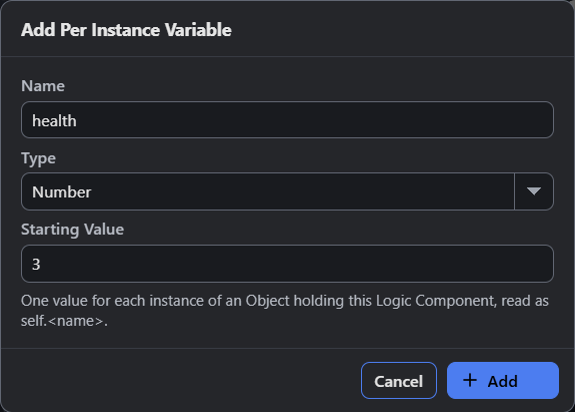
- Name is health, the identifier this Logic will read as self.health.
- Starting Value is 3 for the Number requirement.
Open Marker and set Object Editor Mode to Logic. Click Count Health once in Logic Toolbox, then confirm its enabled row in Attached Logic. The middle workspace shows Per Instance health = 3 and Shared Changeable roundScore = 2.
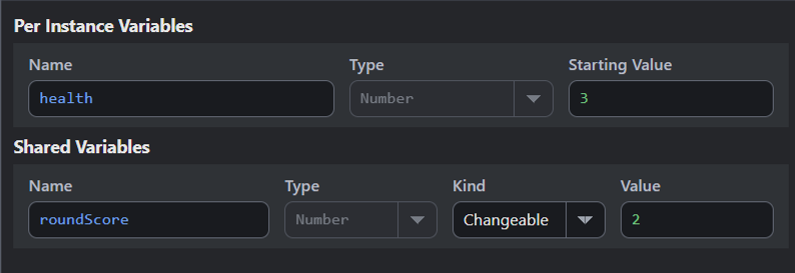
- Each new Marker starts with health 3 unless its placement supplies another starting value.
- Changeable roundScore starts at 2 and is shared by this Object's instances.
Connect the Two Changes
Return to Count Health and select Mode 1. Search the Action List for Change Variable and add it to Mode 1’s connected sequence. If the new block is unattached, right-click it and select Connect to Sequence before editing its fields.
Enter self.health in Variable. Keep the operator = and enter self.health + 4 in Value. Commit each field with Ctrl+Enter. The prefix self. reads the current instance, so another Marker’s health remains a separate value.
Add another Change Variable after the first. Connect it, set Variable to @self.roundScore, keep =, and set Value to @self.roundScore + 1. The @ marks Shared state on the owner’s Object.
Count Health
Create → Mode 1
- Change Variable
Variable: self.health
Operator: =
Value: self.health + 4 - Change Variable
Variable: @self.roundScore
Operator: =
Value: @self.roundScore + 1
End
Both instances run Create. Each adds 4 to its own health, while their two additions raise the common roundScore from 2 to 4.
Set One Placement’s Starting Health
Open Main and select Second Marker in Scene Explorer. Find its enabled Count Health attachment under Logic Components, then open that attachment’s Per Instance Variables. Set Health to 10 and commit the field. Keep the attachment enabled.
First Marker still uses the Object’s starting value of 3. This placement edit gives Second Marker a different starting value without changing the Object default or the Shared score.
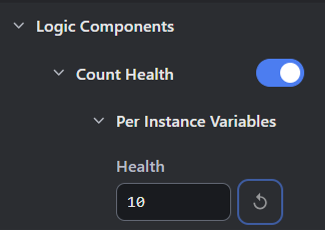
- Health is 10 for this placement; the reset button restores its Object's starting value.
Verify State Ownership
Save the project. Close the editor and reopen the saved file, then check the connected Actions and Second Marker’s starting override.
Start Debug Play and choose Inspect in the Debugger. Select each Marker in Scene Instances. Its X position identifies the placement used here: 10 for First Marker and 14 for Second Marker. Read Health under Instance Variables.
| Live Instance | Starting Health | Health After Create |
|---|---|---|
| First Marker | 3 | 7 |
| Second Marker | 10 | 14 |
For the common score, choose Watch and Pause. In Value or Calculation, enter shared("Marker", "roundScore"), leave the selected-instance switch off, then select Track Value. It reports 4 in global context. The supported shared() function reads a Shared Variable on the named Object.
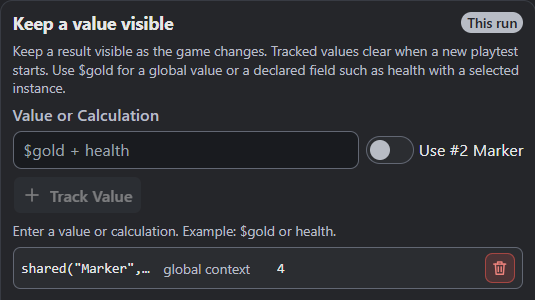
- The tracked Shared value is 4 after both creation handlers run.
Select Stop. Start fresh Debug Play. The same Actions produce health 7 and 14 and roundScore 4 again. New instances start from saved values; the previous run’s changes are gone. Tracked values clear with a new playtest, so add the score expression again when needed.
Choose Where a Value Lives
| Choice | What It Changes | When to Pick It |
|---|---|---|
| Per Instance Variable | Gives each live instance its own mutable value. | Use health or ammunition. Set the Object default or a placement override, then start fresh Play. |
| Shared Changeable | Holds one mutable value on an Object for its instances to share. | Use this example’s common round score. Save its starting value and restart Play to reset it. |
| Shared Constant | Holds a fixed value configured on the Object. | Set a reusable rule that Logic reads without changing it. Save and start fresh Play after editing. |
| Shared Expression | Reads the Object’s configured formula once within each Event run. | Derive a shared value from other state; a later Event run evaluates it again. |
| Local Variable | Belongs to the current execution, starting at its Declare Variable Action. | Keep temporary work within that invocation. A later invocation gets its own locals. |
| Project Global | Holds declared project runtime state, read as $name. |
Share a value such as $score across project Logic. Ordinary runtime state needs explicit save/load to survive closing the game. |
Execution locals differ from the Object state used above. A Function’s locals belong to its call; another call gets its own values. Function Parameters are arguments supplied at the call. Attachable Logic needs Object Variables.
Shared Object Data
Group related fields in a named Data Structure component slot. Compatible Logic can read and change those fields on the live Object. See the Data Structure Editor guide.
Use the same ownership question for live references. An Instance Variable can hold one live instance, while an Instance Set holds a group. See live references for None, destroyed instances, and references kept across Events.
Project Globals
Declare a Project Global’s name and type before using $name. The engine also supplies values such as $playTime, screen dimensions, the player’s local clock, and $prefersReducedMotion.
The local-clock names are $todayYear, $todayMonth, $todayDay, $clockHour, $clockMinute, and $clockSecond. They read the player’s device clock in its local time zone. Pausing simulation doesn’t pause that clock. $prefersReducedMotion reads 1 when the device or browser requests less motion, otherwise 0.
These device values are read-only. Frame delta belongs to the current execution context; loop indices belong to their block. Match scope to the behavior.
Shared State in Older Projects
Back up older projects first. Older Logic Component Parameters can become Object Variables, with applicable placement values carried over. Inspect Object entries and Scene overrides. Save and reopen the converted project before testing its affected behavior.
Troubleshooting
| Symptom | Check and Next Action |
|---|---|
| Both health values move together | Check Variable on the Action. Use self.health for this example, then save and restart Play. |
| The common score has another value | Count active Marker instances and enabled Count Health attachments. Each creation handler adds 1. |
| A starting edit doesn’t change the current run | Stop and start fresh Play so new instances receive the saved values. |
| A temporary value is missing in another Event | Store durable state on its Object or in a declared Project Global. Execution locals belong to their invocation. |
| A Shared write is rejected | Check Kind. Changeable permits runtime writes; Constant and Expression are read-only. |
Where to Look Next
The Change Variable reference lists its exact Variable, operator, and Value fields. The expression guide covers typed values and formulas. Saving and Loading explains explicit persistence.
In Weighted Maze’s Find Route section, the Maze Rules Object holds trial state while Events and named Modes coordinate its changes. Study that larger use of Object state after checking the two Markers here.
Myth Engine Documentation